2.2 Visualizing Two-Variable Relationships
One variable that might explain some of the variation in sale price
is Neighborhood. In the world of real estate, home prices
often vary across neighborhoods, meaning that home prices in
one neighborhood are higher, on average, than those in a different
neighborhood. But then again, home prices vary a lot within the same
neighborhood, too.
Using Color to Visualize Relationships
Unfortunately, the variable Neighborhood is not included
in our previous histogram, so we can't see how PriceK
varies by Neighborhood. But we can visualize the
relationship between PriceK and Neighborhood
in a few ways. One way is by coloring or filling in the data in the
histogram by Neighborhood, assigning
College Creek one color and Old Town
another.
To do this we use the fill = argument, but instead of
putting in a color we put a tilde (~) and then the name of
a variable: fill = ~Neighborhood.
gf_histogram(~ PriceK, data = Ames, fill = ~Neighborhood)
Faceted Histograms
Another way to examine the effect of Neighborhood on
PriceK is to split the histogram we made into two—one for
College Creek and another for Old Town. Using %>%, we
can chain on the command gf_facet_grid() after
gf_histogram(). The following code will put the histograms
of PriceK for College Creek and
Old Town in a grid, one above the other.
gf_histogram(~ PriceK, data = Ames) %>%
  gf_facet_grid(Neighborhood ~ .)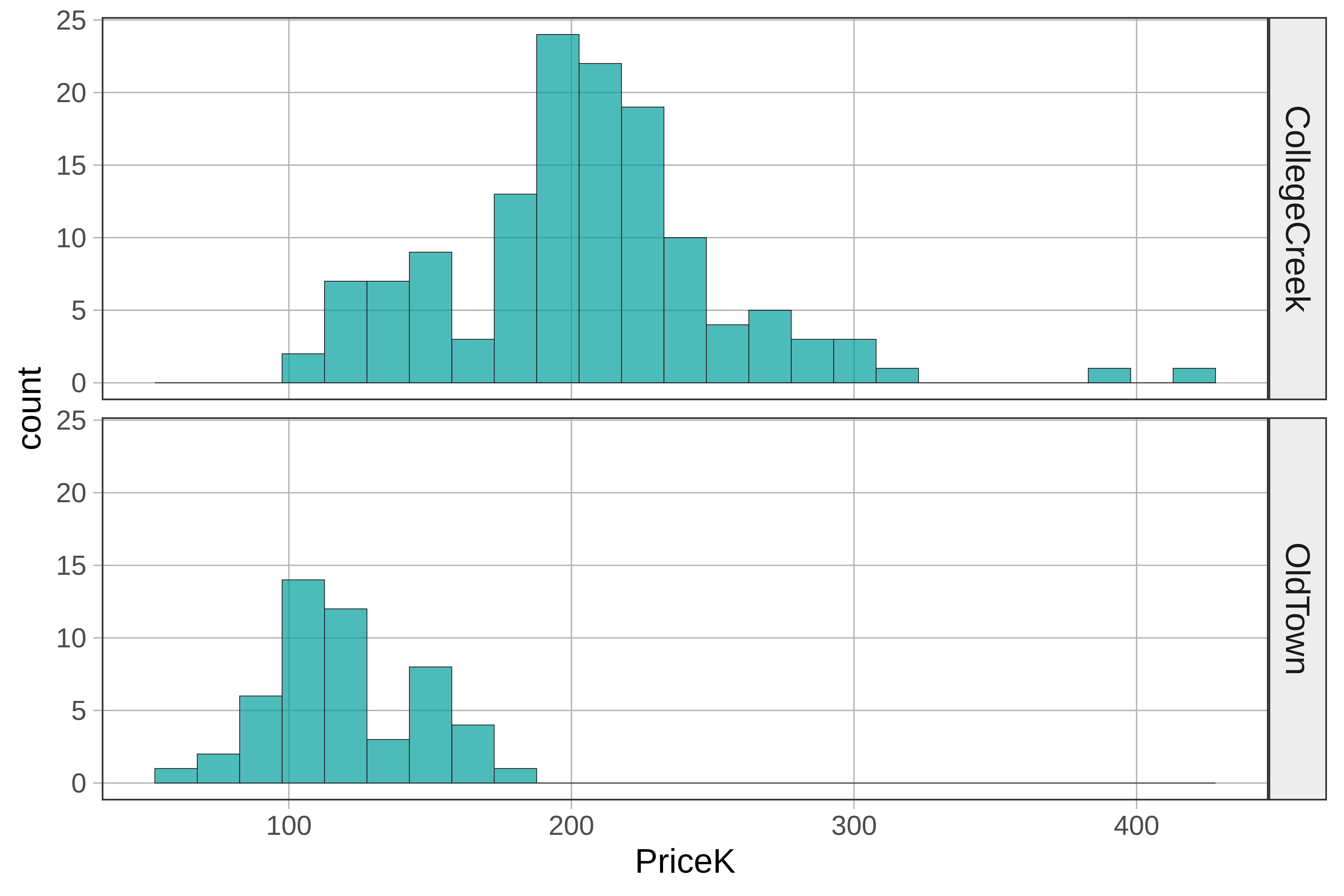
Another way of thinking about Neighborhood explaining
variation in PriceK is to see the distribution of
PriceK as made up of two different distributions, one from
College Creek and one from Old Town. Although these distributions
overlap, we can see that the whole College Creek distribution is shifted
higher (to the right) along the x-axis, which indicates that the average
price of a home in College Creek is higher than in Old Town.
The variation we see by neighborhood can be called between-group variation. This variation among observations in the same neighborhood is an example of within-group variation.

Just for comparison, we’ve put the original histogram (showing all the homes all together in one histogram) along with the separate histograms for each neighborhood.
Notice that each neighborhood's histogram appears to have less
variation than the "all together" histogram. It’s as if some of the
variation in PriceK has been accounted for or
reduced by Neighborhood. Because we can only see
the within-group variation after we separate the distribution according
to Neighborhood, another name for within-group variation is
leftover variation.
Even though there is still a lot of variation in home prices left
over after accounting forNeighborhood, it is still true
that if we know a home’s neighborhood, we can be a little
better at predicting its value. A little better may not be great,
but it is better than nothing.
Using the Tilde (~) to Rearrange Plots
Let’s take a closer look at the R code for making these facet grids of histograms.
gf_histogram(~ PriceK, data = Ames) %>%
  gf_facet_grid(Neighborhood ~ .)
Putting PriceK after the ~ in the
gf_histogram() function above tells R to put the values of
PriceK on the x-axis (think y ~ x).
gf_facet_grid() works the same way. Putting the variable
Neighborhood before the ~ stacks the graphs
for each neighborhood vertically, along the y-axis. In this case, it’s
easier to compare the graphs when we arrange them vertically, one above
the other..
Notice also that gf_facet_grid() has a .
(period) after the ~ (tilde). The period is a placeholder,
which you could replace with another variable. Try replacing the
. with the variable Floors (whether the home
has 1 or 2 floors) in the code below. This will create a faceted grid of
homes in different neighborhoods split up by whether they have 1 or 2
floors.
require(coursekata)
# replace the . with Floors
gf_histogram(~ PriceK, data = Ames) %>%
  gf_facet_grid(Neighborhood ~ .)
# replace the . with Floors
gf_histogram(~ PriceK, data = Ames) %>%
  gf_facet_grid(Neighborhood ~ Floors)
ex() %>%
  check_function(., "gf_histogram") %>% {
    check_arg(., "object") %>% check_equal()
    check_arg(., "data") %>% check_equal()
  }